

Text Selection
gpui-base provides window-level text selection for ordinary GPUI participants. It coordinates pointer gestures, Shift-click extension, selection across multiple text elements, copying, scrolling, scopes, and multi-window lifetime without prescribing how text is laid out or highlighted.
Use it when you render text with StyledText, TextLayout, a virtualized document, or another custom GPUI Element.
Get started
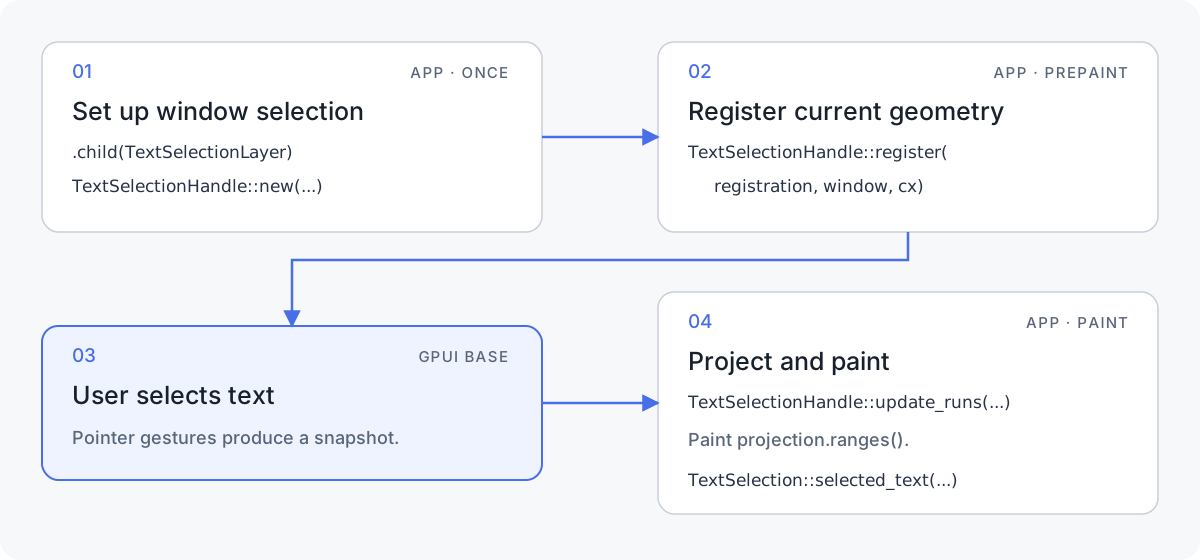
To add text selection to a custom GPUI participant, connect its layout and paint lifecycle to the window selection state as shown below.
A selectable window has three roles:
- One
TextSelectionLayerelement owns the selection state and window pointer handlers. - Each independently selectable text participant owns a stable
TextSelectionHandle. - During rendering, the participant registers current geometry and projects the resulting snapshot onto laid-out
TextSelectionRuns.
Key parts
| API | Lifetime | Purpose |
|---|---|---|
TextSelectionLayer | Once per window | Installs window-level pointer handling and selection state. |
TextSelection | Static API | Queries and controls the window selection. |
TextSelectionHandle | Once per selectable participant | Identifies the participant and stores its callbacks and projected selection. |
TextSelectionRegistration | Recreated each rendered frame | Reports the current hitbox, bounds, scroll offset, scope, and document order. |
TextSelectionRun | Recreated during paint | Describes laid-out text for projection to a UTF-8 byte range. |
TextSelectionProjection | Returned by update_runs | Pairs each submitted run with its selected byte range. |
TextSelectionSnapshot | Produced when selection changes | Describes the participant's endpoints and coverage. |
TextSelectionEvent | Emitted to subscribers | Reports selection changes, clearing, and auto-scroll requests. |
TextSelectionContentKey | Stable content identity | Identifies virtualized content at a selection endpoint. |
The complete flow is:
- Retain one
TextSelectionLayerelement at the window root. - Create one
TextSelectionHandlefor each independently selectable participant. - During prepaint, call
TextSelectionHandle::registerwith aTextSelectionRegistration. - During paint, pass laid-out
TextSelectionRuns toTextSelectionHandle::update_runs. - Paint each returned byte range behind its glyphs.
- Read or clear the window selection through
TextSelection.
The installed layer also provides familiar multi-click behavior: double-click selects a word using the same boundary rules as Input, while triple-click and later clicks select the newline-delimited logical line.
The window state belongs to the retained TextSelectionLayer element. Handles and callbacks never receive or own that internal state.
How it works
gpui-base owns gesture coordination and range projection. The application remains responsible for layout and painting across the participant seam:
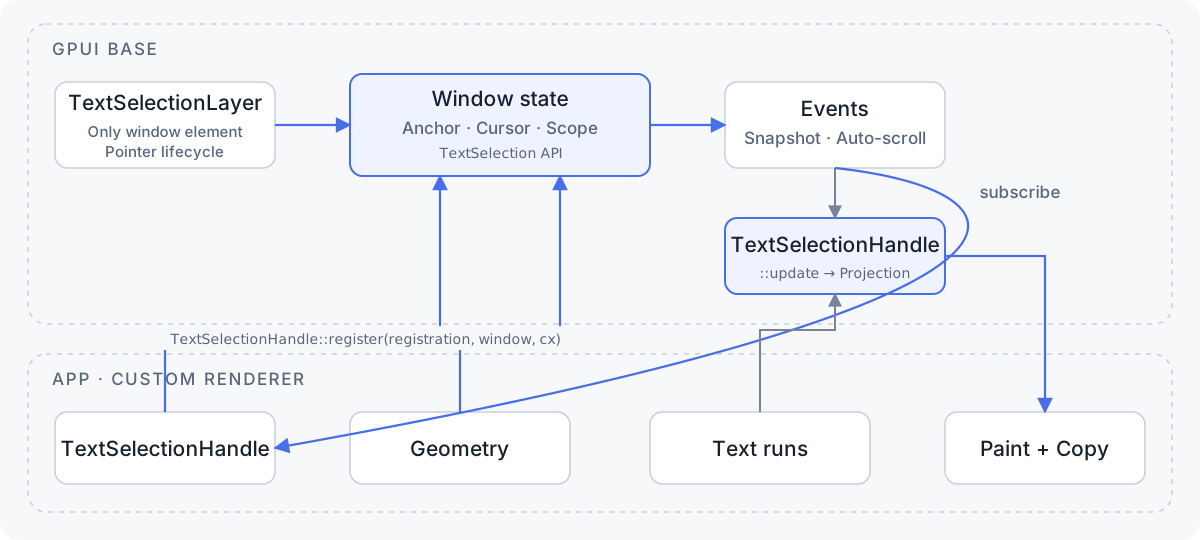
Install the window element
Add one TextSelectionLayer as the first child of the window root:
use gpui::prelude::*;
use gpui::{Context, Render, Window};
use gpui_base::TextSelectionLayer;

impl Render for AppView {
    fn render(&mut self, window: &mut Window, cx: &mut Context<Self>) -> impl IntoElement {
        div()
            .size_full()
            .child(TextSelectionLayer)
            .child(self.content.clone())
    }
}
TextSelectionLayer is a zero-sized element. Keep it first and mount only one per window. Calling TextSelection::activate_scope before the first prepaint stores the scope until the layer binds its window state.
Create a stable handle
Create one handle for the semantic lifetime of the participant. Do not create a new handle every frame.
use gpui::{Context, Subscription, Window};
use gpui_base::TextSelectionHandle;

struct DocumentView {
    selection: TextSelectionHandle,
    _selection_refresh: Subscription,
}

impl DocumentView {
    fn new(window: &Window, cx: &mut Context<Self>) -> Self {
        let selection = TextSelectionHandle::new("", cx);
        let selection_refresh = selection.refresh_window_on_change(window, cx);

        Self {
            selection,
            _selection_refresh: selection_refresh,
        }
    }
}
refresh_window_on_change redraws only the owning window when this handle's selection changes. Retain the returned subscription for as long as the participant is rendered, or explicitly call .detach() when the subscription should live for the rest of the participant entity's lifetime. Use subscribe instead when the participant needs events or more targeted invalidation.
The fallback_copy_text passed to TextSelectionHandle::new is used until the participant projects laid-out runs or supplies custom copy behavior. Use set_fallback_copy_text to replace it.
Register geometry during prepaint
Call TextSelectionHandle::register(registration, window, cx) once per rendered frame, after the handle's bounds and hitbox are known:
use gpui::{Bounds, Hitbox, Pixels, Window};
use gpui_base::TextSelectionRegistration;

fn register_selection(
    handle: &TextSelectionHandle,
    hitbox: Hitbox,
    bounds: Bounds<Pixels>,
    window: &mut Window,
    cx: &mut gpui::App,
) {
    handle.register(
        TextSelectionRegistration::new(hitbox, bounds)
            .with_document_order(0)
            .with_text_bounds(vec![bounds]),
        window,
        cx,
    );
}boundsis the participant's content viewport in window coordinates.text_boundscontains the visible glyph-bearing areas. Blank-only drags do not start a text selection.document_orderprovides stable ordering between participants for cross-participant selection and copy. Do not derive semantic order from aHashMapor accidental paint order.with_scroll_offsetmaps window points into scrolled content coordinates.with_scopeassigns an explicit opaque scope. A surrounding.text_selection_scope(scope)builder overrides it while that subtree renders.
Handles not registered in the current frame stop participating automatically.
Project selection onto text runs
In paint, call TextSelectionHandle::update_runs with laid-out runs containing the exact text used to create each TextLayout. It returns a TextSelectionProjection containing UTF-8-safe byte ranges:
use gpui::{Bounds, Pixels, SharedString, TextLayout};
use gpui_base::TextSelectionRun;

fn selected_range(
    handle: &TextSelectionHandle,
    text: SharedString,
    layout: TextLayout,
    bounds: Bounds<Pixels>,
    cx: &mut gpui::App,
) -> Option<std::ops::Range<usize>> {
    handle
        .update_runs(
            &[TextSelectionRun::new(text, layout, bounds)
                .with_document_order(0)],
            cx,
        )
        .ranges()
        .iter()
        .next()
        .and_then(|range| range.clone())
}
Paint the returned range behind the glyphs, then paint the text normally. Wrapped selections need three kinds of highlight geometry: the remainder of the first line, full-width middle lines, and the prefix of the last line.
For multiple runs, give each run a stable document_order. Input order is preserved in projection.ranges() so each range can be paired with its original layout; document order is used when composing copied text.
The shared Text Selection showcase is the complete runnable example used by both the native command and the live Rust/WASM preview above:
cargo run -p gpui-base --example components -- text-selectionComplete Rust example
use gpui::{Context, IntoElement, ParentElement as _, Styled as _, Window};
#[cfg(test)]
use gpui_base::ElementExt as _;
use gpui_base::{SelectableText, TextSelection};

use super::*;

const PRODUCT_PARAGRAPH: &str = "Selection should feel like a natural part of reading a product brief. Start in this paragraph, continue into the next renderer, and GPUI preserves the document order while every frame supplies fresh geometry for the same stable selection handle.";
const IMPLEMENTATION_PARAGRAPH: &str = "This second paragraph is deliberately long enough to wrap in the showcase. Drag across the boundary to see one continuous highlight, then use the platform copy shortcut to confirm that the copied result follows the visible reading order rather than renderer ownership.";
const INTERNATIONAL_PARAGRAPH: &str = "International text should remain predictable when a line mixes café, déjà vu, Kraków, naïve, and résumé. Resize the window or drag across several wrapped lines; UTF-8 byte ranges still map back to the correct glyphs without splitting a character.";

impl BaseShowcase {
    pub(in super::super) fn text_selection(
        &mut self,
        window: &mut Window,
        cx: &mut Context<Self>,
    ) -> impl IntoElement {
        self.text_selection_active = TextSelection::has_selection(window, cx);
        self.text_selection_text = TextSelection::selected_text(window, cx);

        let active = self.text_selection_active;
        let selected_text = if active {
            self.text_selection_text.clone()
        } else {
            "Drag across any paragraphs to select text.".to_owned()
        };
        let entity = cx.entity().downgrade();

        let footer = div()
            .id("text-selection-footer")
            .h(px(150.))
            .flex_none()
            .flex()
            .flex_col()
            .gap_2()
            .p_3()
            .bg(super::example_rgb(0xf5f5f5))
            .border_1()
            .border_color(super::example_rgb(0xe5e5e5))
            .child(
                div()
                    .font_weight(gpui::FontWeight::SEMIBOLD)
                    .child(if active {
                        "Selection active"
                    } else {
                        "No selection"
                    }),
            )
            .child(
                div()
                    .id("text-selection-preview")
                    .flex_1()
                    .min_h_0()
                    .overflow_y_scroll()
                    .text_color(super::example_rgb(0x525252))
                    .child(selected_text),
            )
            .child(
                Button::new("clear-text-selection")
                    .h_7()
                    .px_2()
                    .flex()
                    .items_center()
                    .justify_center()
                    .self_start()
                    .border_1()
                    .border_color(super::example_rgb(0x171717))
                    .child("Clear selection")
                    .on_click(move |_, window, cx| {
                        TextSelection::clear(window, cx);
                        _ = entity.update(cx, |this, cx| {
                            this.text_selection_active = false;
                            this.text_selection_text.clear();
                            cx.notify();
                        });
                    }),
            );
        #[cfg(test)]
        let footer = {
            let bounds = self.text_selection_footer_bounds.clone();
            footer.on_prepaint(move |value, _, _| *bounds.borrow_mut() = Some(value))
        };

        div()
            .id("text-selection-example")
            .w(px(620.))
            .max_w_full()
            .h(px(520.))
            .max_h_full()
            .flex()
            .flex_col()
            .gap_3()
            .child(
                div()
                    .id("text-selection-scroll")
                    .flex_1()
                    .min_h_0()
                    .overflow_y_scroll()
                    .track_scroll(&self.text_selection_scroll)
                    .flex()
                    .flex_col()
                    .gap_3()
                    .p_4()
                    .child(
                        div()
                            .text_lg()
                            .font_weight(gpui::FontWeight::SEMIBOLD)
                            .child(
                                SelectableText::with_handle(
                                    "selection-heading",
                                    self.text_selection_handles[0].clone(),
                                    "Text selection across renderers",
                                )
                                .document_order(0),
                            ),
                    )
                    .child(
                        div()
                            .text_color(super::example_rgb(0x525252))
                            .line_height(px(22.))
                            .child(
                                SelectableText::with_handle(
                                    "selection-product",
                                    self.text_selection_handles[1].clone(),
                                    PRODUCT_PARAGRAPH,
                                )
                                .document_order(1),
                            ),
                    )
                    .child(
                        div()
                            .text_color(super::example_rgb(0x525252))
                            .line_height(px(22.))
                            .child(
                                SelectableText::with_handle(
                                    "selection-implementation",
                                    self.text_selection_handles[2].clone(),
                                    IMPLEMENTATION_PARAGRAPH,
                                )
                                .document_order(2),
                            ),
                    )
                    .child(
                        div()
                            .text_color(super::example_rgb(0x525252))
                            .line_height(px(22.))
                            .child(
                                SelectableText::with_handle(
                                    "selection-international",
                                    self.text_selection_handles[3].clone(),
                                    INTERNATIONAL_PARAGRAPH,
                                )
                                .document_order(3),
                            ),
                    ),
            )
            .child(footer)
    }
}

#[cfg(test)]
mod tests {
    use gpui::{TestAppContext, point, px};

    use crate::showcase::BaseShowcase;

    #[gpui::test]
    fn text_selection_footer_stays_fixed_when_document_scrolls(cx: &mut TestAppContext) {
        let (view, window) =
            cx.add_window_view(|window, cx| BaseShowcase::new("text-selection", window, cx));
        window.update(|window, cx| window.draw(cx).clear(cx));

        let (footer_bounds, scroll) = view.read_with(window, |view, _| {
            (
                view.text_selection_footer_bounds
                    .borrow()
                    .expect("footer should be painted"),
                view.text_selection_scroll.clone(),
            )
        });
        scroll.set_offset(point(px(0.), px(-80.)));
        view.update(window, |_, cx| cx.notify());
        window.update(|window, cx| window.draw(cx).clear(cx));

        let scrolled_footer_bounds = view.read_with(window, |view, _| {
            view.text_selection_footer_bounds
                .borrow()
                .expect("footer should be painted after scrolling")
        });
        assert_eq!(scrolled_footer_bounds, footer_bounds);
    }
}
Query and control the window selection
Use TextSelection associated functions to read or mutate the window selection. No extension trait import is required:
use gpui_base::TextSelection;

let has_selection = TextSelection::has_selection(window, cx);
let text = TextSelection::selected_text(window, cx);

TextSelection::end(window, cx);   // End a drag, preserving its range.
TextSelection::clear(window, cx); // Clear window and participant-local ranges.
selected_text invokes participant copy callbacks only after the window and handle state leases have been released, so a callback may safely read or update selection state.
Advanced participant adapters
Plain text usually needs only refresh_window_on_change and update_runs. Rich or virtualized participants can configure additional behavior directly on the handle:
| Method | Use |
|---|---|
refresh_window_on_change | Redraw only the owning window when this handle's selection changes. |
subscribe | Receive TextSelectionEvent values for selection changes, clearing, and auto-scroll. |
copy_with | Export source text or include virtualized content that is not currently painted. |
set_fallback_copy_text | Replace the participant's fallback copy text. |
resolve_content_key_with | Attach a stable TextSelectionContentKey to an endpoint. |
focus_with | Focus the participant when a drag begins inside it. |
clear_with | Synchronously clear participant-local state when the window selection clears. |
set_local_selection | Report participant-local selection such as select-all. |
Callbacks are invoked outside selection-state leases. They may update the participant or query TextSelection without causing a reentrant entity borrow.
When subscribe receives TextSelectionEvent::AutoScroll(Some(delta)), feed that delta into the participant's scrolling loop; None stops it. Positive deltas move toward the bottom. The shared showcase demonstrates this with content taller than its viewport.
For a virtualized document, inspect TextSelectionEvent::SelectionChanged and use TextSelectionSnapshot::coverage(), window_points(), and each endpoint's content_point() and content_key(). Coverage distinguishes a bounded participant from one selected from its start, to its end, or in full, allowing copy_with to include unpainted content.
Isolate modal content with scopes
Only handles in the active TextSelectionScopeId participate. Set the active window scope, then mark the corresponding rendered subtree:
use gpui_base::{ElementExt as _, TextSelection, TextSelectionScopeId};

let dialog_scope = TextSelectionScopeId::new();
TextSelection::activate_scope(dialog_scope, window, cx);

let dialog = dialog_content.text_selection_scope(dialog_scope);
Scope stacks are isolated per window and are cleaned up even if a scoped subtree panics while rendering. Changing the active scope clears the previous selection atomically.
Integration checklist
- Retain one
TextSelectionLayerelement as the first child of each custom window root. - Keep each
TextSelectionHandlestable across renders. - Register current geometry every rendered frame.
- Use explicit document order and window-local scopes.
- Pass the exact UTF-8 text used by each
TextLayout. - Paint highlights before glyphs.
- Keep parser, source export, and virtual-document knowledge in the participant.